Evaluating opportunities via a Mahoning County property owner search and analyzing historical sales history is essential for modern real estate investing. The local market remains highly competitive, moving quickly with a median of 43 days on market and a competitive 99% sale-to-list ratio. Investors must leverage the advanced search tool, pull real estate tax assessments, and cross-reference the GIS mapping portal to track target parcel data accurately.
Why Search for Ownership and Sales Data?
Before we dive into the “How,” let’s understand the “Why.” Accessing public records in Mahoning County allows you to:
- Verify Ownership: Ensure the person selling a home actually has the legal right to do so.
- Analyze Market Trends: See what homes in Boardman, Canfield, or Youngstown are actually selling for, rather than just the “asking price” on Zillow.
- Identify Absentee Owners: Find landlords who live out of state, which is a common strategy for off-market deal finding.
- Trace Historical Value: See how a property’s value has fluctuated over the last 20+ years.
Step-by-Step: Finding the Current Property Owner
The Mahoning County Property Search tool is your primary gateway. Here is the professional way to use it:
- Access the Portal: Navigate to the official Auditor’s search page.
- Search by Address: Enter the street number and name. Tips: Use less information for better results (e.g., enter “123 Main” instead of “123 Main Street Northwest”).
- Identify the “Owner” Tab: Once you click on a parcel, the primary summary page will display the “Owner Name.”
- Check for Multiple Owners: If a property is owned by a Trust or an LLC (e.g., Youngstown Holdings LLC), the name might not be a person. In Article 5, we will discuss how to look up these entities via the Ohio Secretary of State.
Decoding the Sales History Table
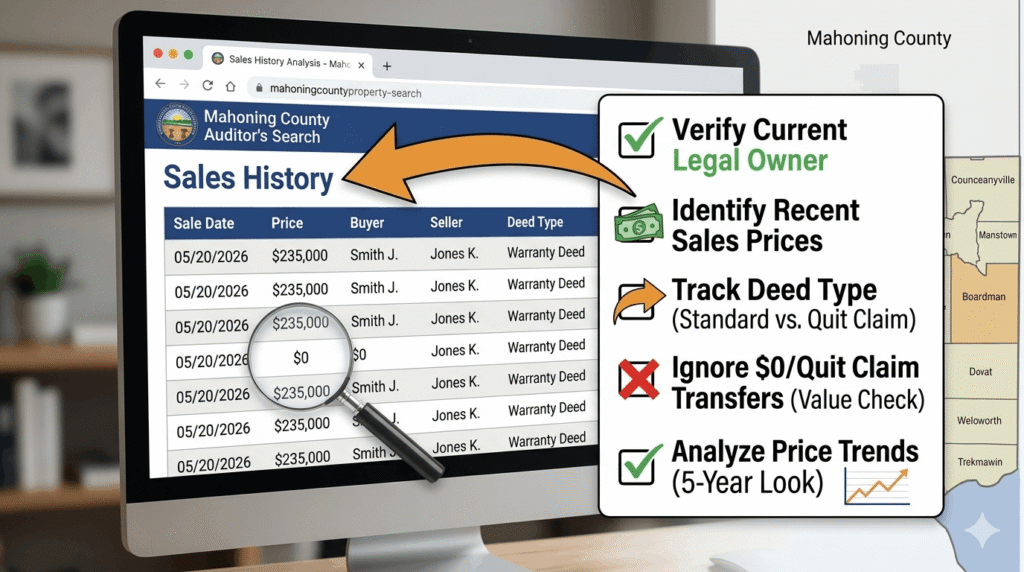
Once you are on the property’s profile, look for the “Transfers” or “Sales” tab. This is where the real “Gold” is located.
Understanding the Data Columns:
- Sale Date: The date the deed was officially recorded.
- Sale Price: The actual dollar amount paid. If you see $0, this often indicates a “Quit Claim Deed” where the property was transferred between family members or into a trust without a market sale.
- Conveyance Number: A unique ID for that specific transaction.
- Deed Type: Look for “Warranty Deed” (Standard sale) vs. “Sheriff’s Deed” (Foreclosure).
How to Use the “Sales Search” Feature for Market Analysis
Instead of searching for one specific house, you can search for all sales in a specific neighborhood. This is how “Comps” (Comparables) are created.
- Select “Sales Search” from the sidebar menu.
- Filter by Date Range: Set it to the last 6 months to get the most relevant 2026 data.
- Filter by School District: For example, select “Boardman Local SD” to see all recent sales in that high-demand area.
- Export the Data: The Auditor’s site allows you to view these as a list. You can see which streets are “hot” and which areas are stagnant.
Avoiding “Low Value” Research: The Professional Tip
Many users make the mistake of trusting the “Total Appraised Value” as the “Market Price.”
Warning: The Auditor’s value is for tax purposes. The Sales History shows what a real buyer paid in the open market. Always prioritize Sales History over Appraised Value when determining what a house is worth.
Advanced Research: Finding the Deed
If the Sales History shows a transfer but you want to see the actual legal document, you must visit the Mahoning County Recorder’s Office website.
- Use the Instrument Number found on the Auditor’s site.
- Search the Recorder’s database to view the signed deed, which may contain details about easements, restrictions, or secondary owners not listed on the tax bill.
Interactive Action: Start Your Research
To make your research easier, use our direct link to the Sales Search portal:
📊 Ready to Check Recent Sales?
Use the official Sales Search tool to see what homes in your area actually sold for.
Search Sales History NowConclusion
Tracking property ownership and sales history in Mahoning County is the most reliable way to understand the local real estate market. By looking beyond basic tax info and diving into the Sales Tab, you gain a clear picture of a property’s true market value. Whether you are verifying an owner for a potential purchase or gathering data for a tax appeal , these official records are your most valuable resource.
FAQs
Why is the owner’s name different from what I see on Zillow?
Zillow and third-party sites can take weeks to update. The Mahoning County Auditor site is the official legal record. If there was a recent sale, the Auditor’s site will always be more accurate than a commercial real estate app.
What does “Valid Sale” mean in the records?
The Auditor marks sales as “Valid” if they represent an “Arm’s Length Transaction” (a normal sale between strangers). “Invalid” sales might be foreclosures, family transfers, or sales involving government agencies that don’t reflect true market value.
How far back does the Mahoning County sales history go?
Most digital records go back to the mid-1990s. For sales older than that, you may need to visit the Auditor’s office in person at the Youngstown courthouse to view paper “Transfer Books.”