
Finding a Mahoning County Tax Map or viewing parcel boundaries is now easier than ever with the 2026 GIS system.The Mahoning County GIS (Geographic Information System) and Tax Maps offer a comprehensive digital window into the county’s land records. Managed by the County Engineer’s office, these tools provide transparency and precision for property data in 2026. In this guide, we will walk you through how to use the interactive GIS map to find any parcel in Mahoning County, Ohio, with updated technical insights.
What is the Mahoning County GIS Map?
The GIS system is a sophisticated spatial database maintained by the Mahoning County Engineer’s Office. Unlike a standard Google Map, a GIS map combines geographical coordinates with specific property attributes. This allows users to visualize:
- Exact Parcel Boundaries: See where one property ends and another begins with surveyed accuracy.
- Aerial Photography: View high-resolution satellite imagery to inspect structures, pools, and foliage.
- Topography & Contours: Understand the elevation and slope of the land, which is vital for drainage and construction planning.
- Zoning Classifications: Identify if a piece of land is zoned for residential, commercial, industrial, or agricultural use.
Understanding Layers in Mahoning County GIS
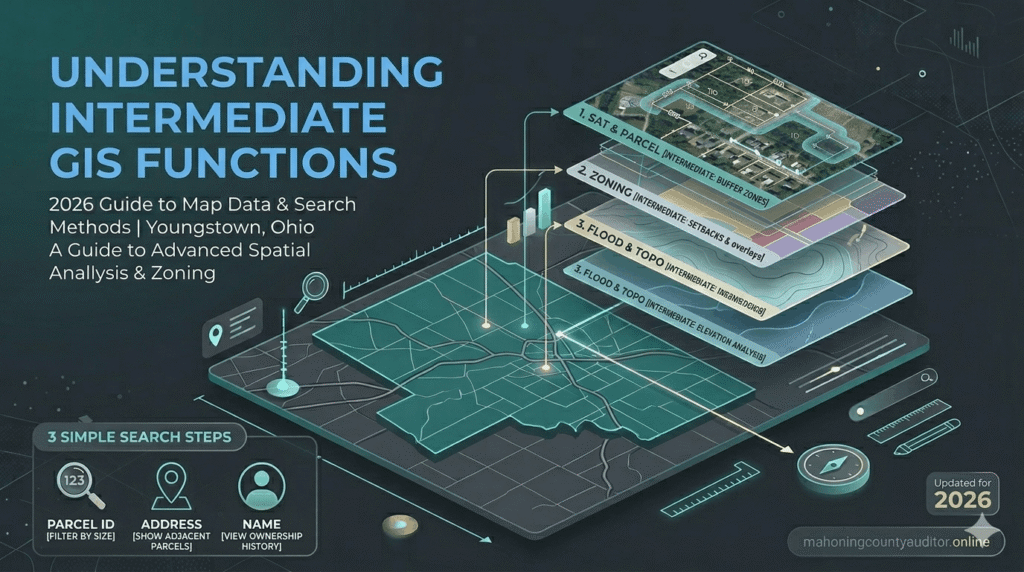
One of the most powerful features of the Mahoning County GIS portal is the ability to toggle different data “layers.” These layers act like transparent sheets stacked on top of each other:
- The Parcel Layer: This is the primary layer showing property lines and unique Parcel identification numbers (PIN).
- Hydrology & Flood Plains: Critical for insurance purposes, this layer highlights rivers, streams, and areas designated as flood zones by FEMA.
- Tax Districts: This layer clearly defines the administrative boundaries for school districts and townships, such as Boardman, Austintown, and Canfield.
- Historical Imagery: Some versions of the GIS allow you to look back at satellite photos from previous years to see how a property has changed over time.
How to Search the Tax Map (Step-by-Step Guide)
To start your property search and view interactive layers, visit the official Mahoning County Engineer’s GIS Portal
Navigating the Mahoning County Parcel Viewer is user-friendly if you follow these specific steps:
- Access the Portal: Visit the official Mahoning County GIS website. Ensure your browser is updated for the best interactive experience.
- Search by Address: The most common method. Enter the house number and street name. The map will automatically zoom to the specific lot.
- Search by Parcel ID: If you have your 12-digit PIN from a tax bill, enter it for 100% accuracy. This eliminates confusion between similar-sounding addresses.
- Search by Owner Name: Useful for finding all land holdings associated with a specific person or corporation within Mahoning County.
- Identify Tool: Once you click on a parcel, an “Information Box” will appear. This provides a direct link to the Auditor’s property card.
Pro Tip: If you find a parcel on the map and want to verify its current market value or annual tax bill, cross-reference the data using our Mahoning County Property Search guide.
Why Real Estate Investors Use GIS Maps
Professional investors in the Youngstown area rarely buy property without a deep dive into the GIS data. Here is why:
- Easements: You can identify if there are utility easements (power lines, sewer pipes) that prevent building on certain parts of the lot.
- Encroachments: By looking at boundary lines versus satellite views, you can see if a neighbor’s fence or driveway is accidentally crossing onto the subject property.
- Road Access: Verify if a property has “Right of Way” access or if it is landlocked, which significantly affects its value.
Official Tax Maps vs. Interactive GIS
It is important to distinguish between the digital GIS interface and the Official Tax Map. While the GIS map is excellent for visual reference, the physical or PDF Tax Map is the legal instrument used for drafting deeds and property transfers.
- Maintenance: The Mahoning County Engineer’s Tax Map Department updates these records daily as new subdivisions and lot splits are recorded.
- Legal Standing: In court or for official surveys, the technical line drawings from the Tax Map department take precedence over the satellite-rendered GIS view.
Table: Comparison of Mapping Tools
| Feature | GIS Interactive Map | Official Tax Map |
| Visual Style | Satellite & Multi-layered | Technical Line Drawing |
| Primary Use | General Research & Zoning | Legal Deeds & Property Splits |
| Update Frequency | Periodic Synchronization | Daily / Real-time |
| Data Source | Multi-Departmental Data | Engineer’s Office Records |
| Accessibility | 24/7 Online Portal | Engineer’s Office / PDF Archives |
Data Source: Verified via the Official Mahoning County Engineer’s GIS Portal (2026 Updated Records)
Conclusion
Mastering the Mahoning County GIS and Tax Map tools is the best way to ensure you are fully informed about the land you own or intend to buy. From checking school district lines to verifying exact lot dimensions, these digital resources bring transparency to the Youngstown real estate market. Always remember to use the GIS for visual planning and the official Tax Maps for legal certainty.
FAQs
How often is the Mahoning County GIS data updated?
The digital map interface is synced regularly with the Auditor and Treasurer databases. However, the core parcel geometry (the lines) is updated daily by the Engineer’s Office to reflect recent sales and divisions.
Is the GIS map accurate enough for a fence installation?
No. While the GIS map is highly accurate, it is not a substitute for a professional land survey. Before installing a fence or building a structure, you should hire a licensed surveyor to mark the physical pins on your property.
Where is the Mahoning County Tax Map Office located?
The Tax Map department is located within the Mahoning County Engineer’s Office at 3648 Canfield Rd, Canfield, OH. They are available for in-person consultations regarding complex boundary issues.
Can I see property tax amounts on the GIS map?
The GIS map usually provides a link to the Auditor’s site. To see the specific tax breakdown, you will need to click the “Property Details” link within the GIS information window.
Are there flood zone overlays on the map?
Yes, by selecting the “Environmental” or “FEMA” layer in the map legend, you can see if a property falls within a 100-year or 500-year flood plain.